Are Smart Locks Safer Than Traditional Deadbolts?
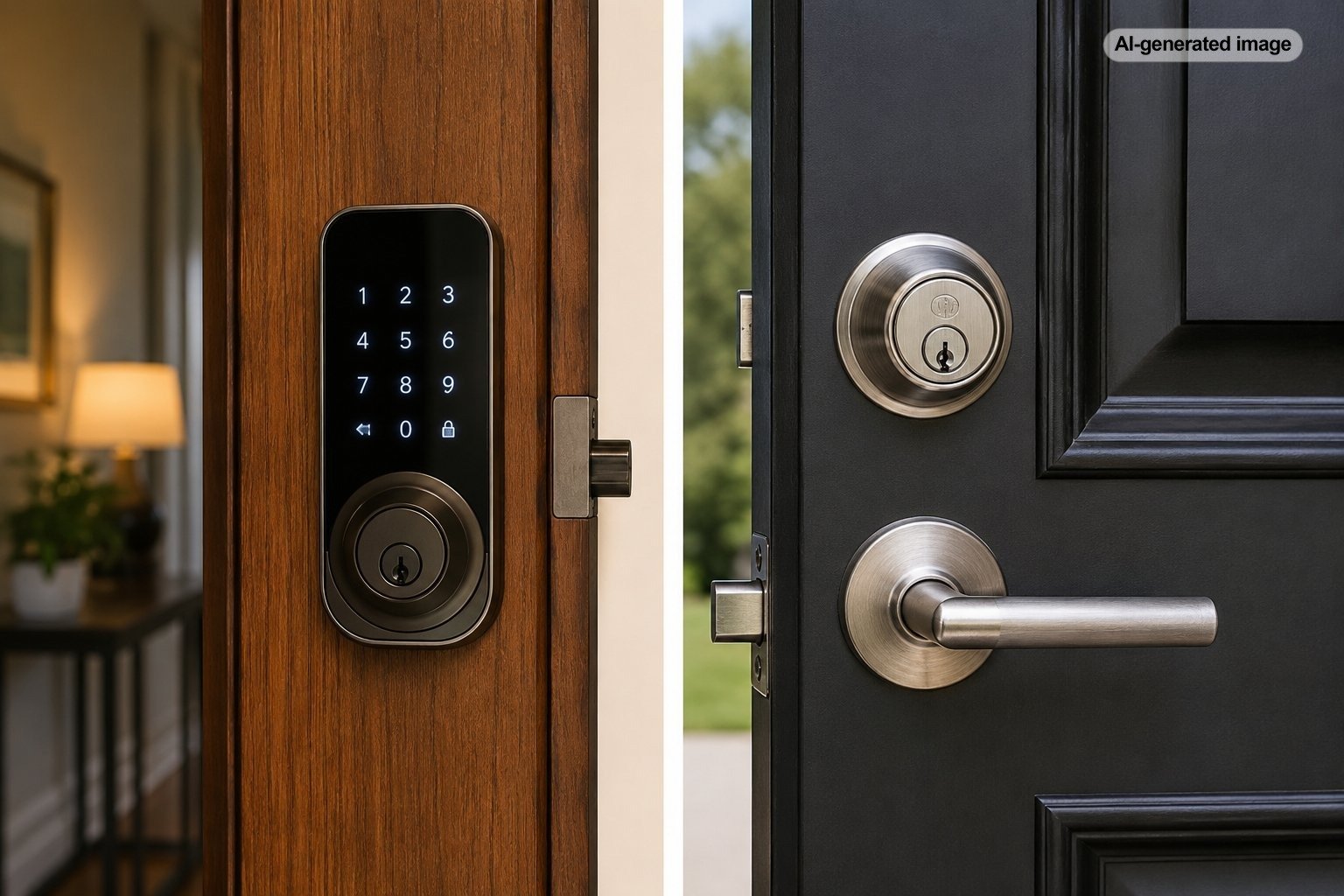
Smart locks are not automatically safer than traditional deadbolts, but a well-chosen model can make a home easier to secure in everyday life. The mechanical strength of the lock still matters, while features such as automatic locking, access logs, temporary codes, and remote alerts can reduce common human errors.
The more accurate comparison is not technology versus tradition. It is a properly installed, strong lock with sensible access habits versus a weak or poorly managed one. A basic deadbolt can provide excellent physical resistance, while a smart lock can combine comparable hardware with better control over who enters and when.
What actually makes a lock secure?
A front-door lock has several jobs. It must resist physical force, limit unauthorized access, operate reliably, and remain manageable for the people who live in the home. Smart features can improve the last two areas, but they do not compensate for a flimsy door, loose strike plate, damaged frame, or poorly installed bolt.
Residential deadbolts may be evaluated under ANSI/BHMA standards covering security, durability, and finish performance. BHMA identifies grade levels within applicable standards, with Grade 1 representing the highest performance level. A grade is more useful than vague packaging language such as heavy duty or premium security.
Some smart locks replace the entire deadbolt, while retrofit models turn an existing interior thumb turn. That distinction matters. A full replacement depends on the quality of the new mechanical components. A retrofit lock may preserve the exterior cylinder and much of the existing deadbolt hardware, although compatibility and installation still need careful attention.
| Security factor | Smart lock | Traditional deadbolt |
|---|---|---|
| Physical resistance | Varies by hardware, grade, door, frame, and installation | Varies by hardware, grade, door, frame, and installation |
| Forgotten locking | Automatic locking may reduce the risk | Depends on the user remembering |
| Shared access | Codes or digital credentials can often be changed or limited | Usually requires sharing and recovering physical keys |
| Activity awareness | May provide notifications or history | Usually provides no record of use |
| Cybersecurity exposure | Present on connected models and dependent on setup and support | Generally absent |
| Power dependence | Uses batteries or another power source, usually with backup entry | No battery required |
| Maintenance | Hardware care plus batteries, software, accounts, and permissions | Primarily mechanical inspection and lubrication as directed |
Where smart locks can be safer
They can prevent unlocked-door mistakes
A strong deadbolt offers little protection when it is not engaged. Automatic locking can address the familiar moment when someone leaves in a rush and cannot remember whether the door was secured. Some locks also report their status through an app, although the accuracy of that information depends on the model, installation, connectivity, and whether a separate door-position sensor is used.
They make temporary access easier to control
Physical keys are convenient until one disappears into a contractor’s toolbox, a pet sitter’s kitchen drawer, or a former roommate’s pocket. A smart lock may allow a homeowner to create a separate credential, restrict when it works, and remove it without replacing the cylinder or collecting a key.
This is particularly useful for vacation properties, multigenerational households, caregivers, cleaners, and families with children who arrive home independently. Separate codes can also make it easier to identify whose credential was used, provided the household is comfortable with the associated data collection.
They can improve visibility
Notifications and access history do not physically reinforce a door, but they can reveal patterns that would otherwise go unnoticed. A homeowner may learn that a door was left unlocked, a recurring code was used outside its expected schedule, or an old credential was never removed.
The safest lock is not merely difficult to defeat; it is also difficult for the household to misuse.
Where a traditional deadbolt can be safer
It has a smaller digital attack surface
A conventional deadbolt has no app account, wireless connection, cloud service, or software update process. There is no password to reuse, no remote account to compromise, and no manufacturer platform that must remain supported. For homeowners who do not want to manage another connected device, that simplicity is a genuine security advantage.
Internet-connected locks add cybersecurity and privacy considerations. The Federal Trade Commission and the National Institute of Standards and Technology advise consumers to secure connected devices with strong, unique credentials, multi-factor authentication when available, current software, and a properly protected home network.
It is less dependent on ongoing support
A quality mechanical deadbolt can continue operating without a phone, app, wireless hub, internet connection, or vendor server. Connected smart-lock functions may change if an app is discontinued, an integration is removed, or software support ends. The mechanical lock may still work, but the features that justified the purchase could become limited.
It requires less routine administration
Smart locks need batteries, account oversight, code cleanup, software updates, and occasional troubleshooting. A traditional deadbolt still needs inspection and proper operation, but it generally asks less of the homeowner. A lock that is simple enough to maintain consistently may be safer than a more capable system that is neglected.
The door and frame may matter more than the app
Burglary resistance is not determined by the lock alone. The bolt must extend fully into a correctly positioned strike, the door should fit the opening properly, and the surrounding frame must be sound. A loose strike plate or damaged jamb can undermine an otherwise capable deadbolt.
Installation errors are especially common when a smart lock is fitted to a door that already rubs, sags, or requires a shoulder to close. The motor may struggle to extend the bolt, drain batteries quickly, or report an incorrect locking status. Before adding automation, make sure the deadbolt operates smoothly by hand without pushing, pulling, or lifting the door.
Exterior doors with glass near the lock raise another consideration. A single-cylinder deadbolt has an interior thumb turn that may be reachable through broken glass, while a double-cylinder design requires a key on both sides and can create serious emergency-egress concerns. Door hardware and egress requirements vary, so homeowners should not replace an interior thumb turn with a keyed cylinder without checking applicable rules and obtaining qualified guidance.
How to choose a secure smart lock
Before you decide
- Look for clear ANSI/BHMA performance information rather than relying on general security claims.
- Confirm that the lock fits the door thickness, backset, bore holes, handing, and existing hardware.
- Check what happens when batteries die, the phone is unavailable, or the internet goes down.
- Prefer a manufacturer that clearly explains software updates, account security, privacy practices, and support.
- Use multi-factor authentication when available and create a unique account password.
- Review whether guest codes can expire, follow schedules, and be deleted individually.
- Determine whether remote unlocking requires Wi-Fi, a separate hub, or a subscription.
- Confirm that household members can operate the lock reliably during an emergency.
Backup access deserves particular attention. Depending on the design, a smart lock may provide a physical keyway, exterior battery contacts, a removable power connection, or another emergency method. Understand the procedure before the batteries fail, and do not keep the only backup key inside the locked home.
Privacy also belongs in the buying decision. Access records can be useful, but they may reveal household routines. Review what data the lock collects, where it is stored, who can access it, and whether integrations with voice assistants or other platforms expand that exposure.
How to use a smart lock more safely
What to do
- Secure the account. Use a unique password and enable multi-factor authentication when the service offers it.
- Update the lock and app. Install security updates and keep the associated phone operating system current.
- Protect the network. Use modern Wi-Fi security, change default router credentials, and keep router software updated.
- Assign individual credentials. Avoid one shared household code when separate codes are practical.
- Remove old access promptly. Delete credentials for former residents, workers, guests, and discontinued services.
- Replace batteries early. Respond to low-battery warnings instead of waiting for the lock to stop operating.
- Test backup entry. Verify periodically that the physical key or emergency power method works.
- Inspect the opening. Check that the bolt extends freely and that screws, hinges, strike hardware, and the frame remain secure.
Which option is best for your household?
A smart lock is often the better choice for a busy household that regularly shares access, worries about forgetting to lock the door, or values immediate notifications. It can also support aging in place when a keypad or phone credential is easier to manage than a small key, although controls should remain understandable and accessible to every resident.
A traditional deadbolt may be preferable for a homeowner who values long-term simplicity, lives where connectivity is unreliable, does not want household access data stored digitally, or knows that software and battery maintenance will be ignored. It is also a sensible choice for a secondary door that does not need elaborate access management.
Some homes benefit from a mixed approach: a connected lock on the main entrance and conventional deadbolts on less frequently used exterior doors. The goal is not to make every opening equally clever. It is to give each door the appropriate combination of physical strength, reliable operation, and manageable access.
Frequently asked questions
Can someone hack a smart lock?
Any connected device may introduce digital risks, but risk varies by product architecture, account security, software support, network setup, and user habits. Strong credentials, multi-factor authentication, updates, and careful permission management reduce exposure. Physical weaknesses in the door or lock remain important regardless of cybersecurity.
Do smart locks work during a power or internet outage?
Many battery-powered locks continue to operate locally during a household power or internet outage, but remote features may be unavailable. Designs differ, so verify the manufacturer’s instructions for offline operation and emergency access before purchasing.
Are keypad locks safer than keys?
A keypad eliminates problems such as lost or copied keys, but codes can be observed, shared, reused, or left active too long. Individual codes, temporary permissions, and routine credential cleanup make keypad access more useful.
Should a smart lock still have a key?
A physical keyway offers familiar backup access but also retains the vulnerabilities and maintenance needs of a mechanical cylinder. Key-free models avoid that cylinder but require another dependable emergency-entry method. Neither arrangement is universally superior.
Is a smart lock worth installing on every exterior door?
Usually not. Prioritize the entrance where access management or automatic locking will provide a real benefit. Other doors may be better served by strong conventional hardware and a consistent locking routine.
Sources & further reading
- Builders Hardware Manufacturers Association: ANSI/BHMA A156.40 – 2025 Residential Deadbolts
- Builders Hardware Manufacturers Association: Product Classification & Grade Levels
- National Institute of Standards and Technology: 7 Tips to Keep Your Smart Home Safer and More Private
- Federal Trade Commission: Securing Your Internet-Connected Devices at Home
- Cybersecurity and Infrastructure Security Agency: Securing Your Home Wi-Fi