Why Does My Smart Thermostat Say It Is Offline When Wi-Fi Works?
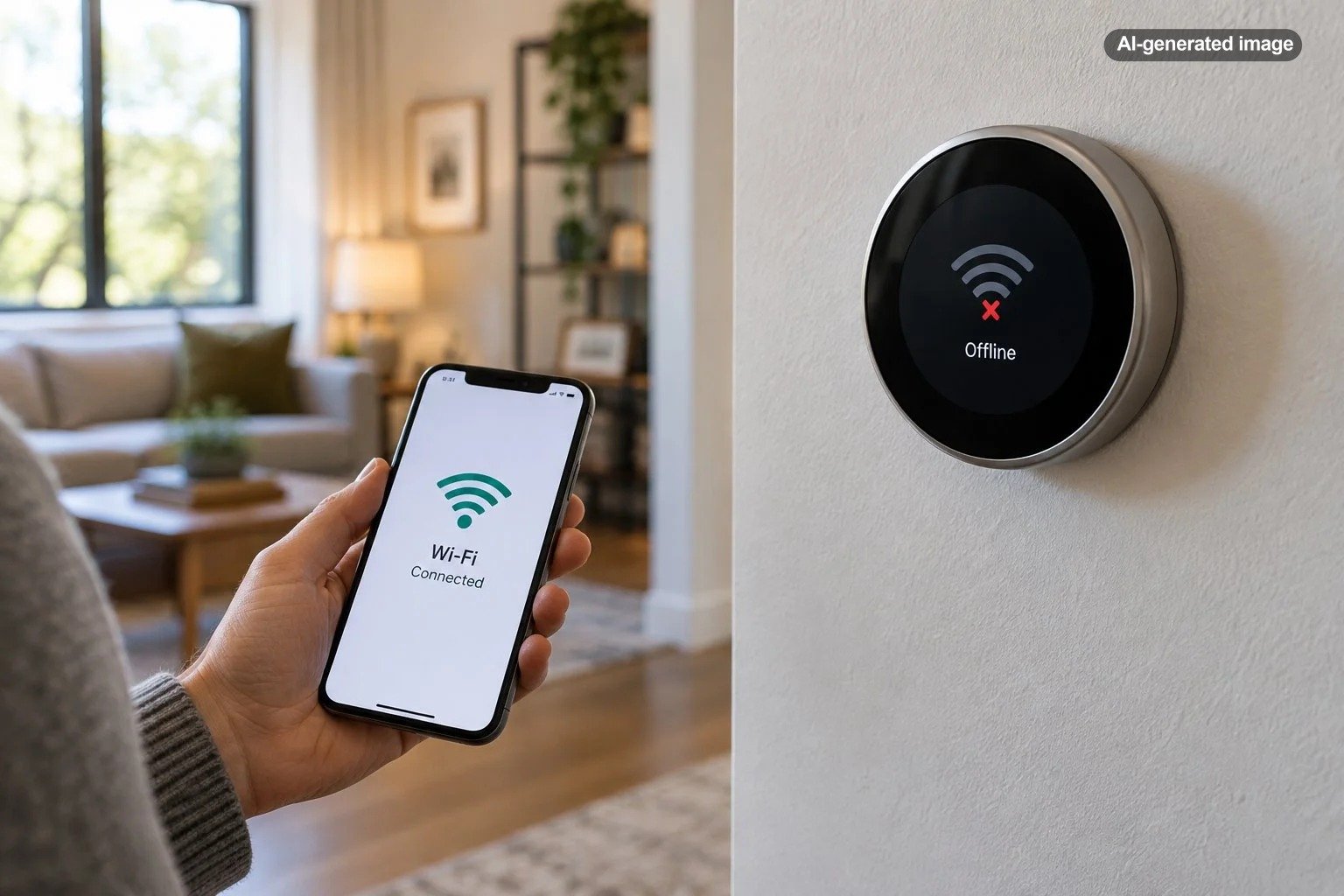
Your smart thermostat can say it is offline even when your home Wi-Fi appears to be working perfectly. That usually means the thermostat has lost its own connection to the router, cannot communicate with its manufacturer’s online service, or is experiencing a power or software problem. A phone streaming video without difficulty does not prove that every connected device in the house has a reliable connection.
The good news is that an offline message does not automatically mean the thermostat is broken or that your heating and cooling equipment has failed. Many connection problems can be traced to a changed Wi-Fi password, weak signal, temporary service interruption, or a device that needs to reconnect. The important first step is determining whether the thermostat itself has lost connectivity or only appears unavailable in its companion app.
Why a Working Wi-Fi Network Does Not Guarantee a Connected Thermostat
There are several separate connections involved in remote thermostat control. Your thermostat communicates with a wireless router, the router provides access to the internet, and the thermostat may rely on the manufacturer’s cloud service to communicate with an app on your phone.
A problem anywhere along that path can produce an offline message. Your phone and laptop might continue working because they have stronger wireless radios, support different network bands, or are positioned much closer to the router.
It also matters where you see the warning. An offline message displayed directly on the thermostat can indicate a different problem from an offline message that appears only in the mobile app.
| What you notice | Possible explanation | Best first check |
|---|---|---|
| Thermostat says Wi-Fi disconnected | Local wireless connection problem | Open the thermostat’s network settings |
| App says offline, but thermostat shows connected | App, internet, or cloud communication issue | Check service status and refresh the app |
| Thermostat repeatedly disconnects | Weak signal, interference, or unstable power | Check signal strength and device power |
| Problem began after router replacement | Saved network information may be outdated | Verify network name, password, and compatibility |
| Display is blank or shows a power warning | Possible thermostat or HVAC power issue | Follow the manufacturer’s power troubleshooting guidance |
Start by Checking Whether the Thermostat Still Controls Your HVAC System
Before changing any settings, walk over to the thermostat and look at its display. Is the current room temperature visible? Can you open the settings menu? Does it respond when you adjust the requested temperature?
If the display works and the equipment responds normally, the immediate problem may be limited to remote connectivity. Many smart thermostats can continue basic local temperature control while disconnected from the internet, although available functions depend on the model and system configuration.
If the display is blank, constantly restarting, or showing a wiring or power error, treat the situation differently. That may indicate a power supply or HVAC equipment issue rather than an ordinary wireless problem.
The Most Common Reasons a Smart Thermostat Goes Offline
1. The Wi-Fi signal is weaker at the thermostat
Wireless coverage is not uniform throughout a home. Walls, ductwork, metal surfaces, appliances, and the location of the router can affect signal quality. A thermostat mounted in a hallway may receive a substantially different signal from a phone used in the living room.
Weak connections can also be intermittent. The thermostat might appear online during one part of the day and offline later, especially if interference or network congestion changes.
Look for a connection-strength indicator in the thermostat’s network or technical information menu. Some manufacturers provide additional diagnostic information, including communication quality or connection history.
2. Your router or Wi-Fi password changed
A new router, updated Wi-Fi password, renamed network, or modified security setting can prevent a thermostat from reconnecting. Even if the replacement router uses the same internet provider, it may not use the same wireless configuration.
Check the network name saved on the thermostat. If the router was recently replaced, follow the manufacturer’s instructions for changing the thermostat’s Wi-Fi network.
Do not assume that a new router’s default security settings are compatible with every older thermostat. Supported wireless bands and security protocols vary by model.
3. The thermostat connects to Wi-Fi but cannot reach the internet
A device can establish a wireless connection without successfully reaching the online services it needs. Router security restrictions, DNS problems, network isolation, or temporary internet disruptions can interfere with communication.
Some thermostats require communication with a manufacturer’s service before remote controls and status updates appear correctly in the app. If that communication fails, the device may appear offline even while connected to the router.
4. The thermostat has a temporary software or connection problem
Like other connected electronics, smart thermostats can occasionally experience software glitches or interrupted communication sessions. A normal device restart may restore the connection without deleting schedules or equipment configuration.
Use the thermostat’s documented restart command rather than immediately choosing a factory reset. Restart and reset are not interchangeable operations.
5. The thermostat is not receiving adequate power
Power problems can sometimes appear as network problems. Certain thermostats reduce wireless activity or disconnect when their internal battery charge becomes too low.
Some installations depend on a common wire, often called a C-wire, or another manufacturer-approved power arrangement. Whether one is required depends on the thermostat and HVAC system.
Recurring low-battery notifications, unexpected display shutdowns, or frequent restarts deserve closer attention. These symptoms should not be treated as proof that a router is defective.
6. The manufacturer’s service or mobile app is having trouble
Sometimes the problem is not inside your house. A temporary cloud-service interruption can prevent a working thermostat from reporting its status to the app.
Outdated app software, account authentication problems, or the wrong home selected within a multi-property account can also cause confusion. Check the manufacturer’s official service-status information when available, and confirm that you are signed into the correct account.
How to Get Your Smart Thermostat Back Online
Work through these checks in order. Start with actions that do not change the thermostat’s setup, then move toward network reconfiguration only if necessary.
What to do
- Test your actual internet connection. On a phone, temporarily disable cellular data and connect through your home Wi-Fi. Open a website to confirm that the internet works rather than merely showing a Wi-Fi symbol.
- Inspect the thermostat itself. Check its display, network status, and any error messages. Record error codes before making changes.
- Refresh the mobile app. Confirm the correct home and account, check for an app update, and reopen the app.
- Restart the thermostat normally. Follow the manufacturer’s instructions for your exact model. Allow it to reconnect before trying additional changes.
- Restart your router. Use the router manufacturer’s recommended restart procedure. If your system has separate access points or mesh nodes, follow their documented restart guidance.
- Check signal strength. Review the thermostat’s wireless diagnostics, if provided. Consider router placement and interference before purchasing additional networking equipment.
- Review recent network changes. Verify the Wi-Fi name, password, security mode, and wireless-band compatibility. Reconnect using the thermostat manufacturer’s instructions.
- Investigate persistent error codes. Consult the specific device’s support documentation, especially when the thermostat reports a power or hardware problem.
After each step, give the device an opportunity to reconnect and check both the wall display and mobile app. Changing several settings simultaneously can make it difficult to identify which action solved the problem.
Could a 2.4 GHz or 5 GHz Wi-Fi Setting Be Responsible?
Yes, depending on the thermostat model. Some smart thermostats support only certain Wi-Fi bands, while others support both 2.4 GHz and 5 GHz networks. A router can provide excellent internet service to modern phones while still using wireless settings that are incompatible with a particular thermostat.
The 2.4 GHz band often provides broader coverage through household obstacles, while 5 GHz can offer higher speeds under favorable conditions. Thermostats generally need a reliable connection rather than especially high bandwidth.
Many newer routers combine bands under one network name and automatically direct devices between them. This works well for many households, but certain connected devices can have difficulty during setup or reconnection.
Before splitting wireless network names or changing security settings, verify the exact capabilities of your thermostat and consult your router’s documentation. Avoid weakening your whole home’s network security merely to accommodate an older device.
What If the Thermostat Says Online but the App Says Offline?
This distinction is especially important because it changes the troubleshooting priority. If the thermostat reports a successful network connection, the next question is whether it can communicate with the manufacturer’s servers.
First, confirm that other connected devices can access the internet. Next, update and reopen the thermostat app. Check whether the manufacturer is reporting a service interruption.
If the problem affects only one mobile device, compare the app status on another authorized phone or tablet when possible. This may help distinguish an account or app problem from a thermostat problem.
If the thermostat is connected to Wi-Fi but cannot communicate with outside services, review router security features and any recent network changes. Advanced restrictions such as device isolation, firewall rules, or filtering may need attention. Follow official support instructions rather than turning off security protections without understanding the consequences.
Why Does My Smart Thermostat Keep Going Offline and Coming Back?
Repeated disconnections often point toward an intermittent problem rather than an incorrect password. Common possibilities include marginal signal strength, wireless interference, unstable equipment power, or a router that periodically interrupts connections.
Notice when the problem occurs. Does it happen after an internet equipment restart? During periods of heavy household network activity? When the heating or cooling equipment starts? Following a power interruption?
These observations are clues, not diagnoses. A connection drop that coincides with HVAC operation could justify evaluating thermostat power, but it does not automatically prove a wiring defect.
For a household using a mesh system, also consider whether the thermostat has a stable connection to an appropriate access point. Moving a router or node a modest distance may help in some homes, although adding more equipment is not always the answer.
Should You Factory Reset an Offline Thermostat?
Usually not as the first troubleshooting step. A factory reset can erase schedules, network credentials, equipment settings, and other configuration information, depending on the device.
Some manufacturers offer a network-only reset that clears wireless settings without removing the entire thermostat configuration. When available and appropriate, that is often a more targeted step than restoring factory defaults.
Before resetting anything, identify the exact model, review the manufacturer’s instructions, and make sure you have the information required to configure it again. An incorrectly reconfigured thermostat can create problems that are more inconvenient than the original offline warning.
When Does an Offline Thermostat Need Repair or Replacement?
An occasional connectivity interruption does not usually justify replacing a thermostat. If normal restarts, supported network settings, and manufacturer troubleshooting restore reliable operation, replacement may offer little benefit.
Replacement becomes more reasonable when the manufacturer identifies a hardware fault, the device can no longer maintain a supported connection, or an underlying failure cannot be resolved.
For example, Google documents a W5 error affecting certain older Nest thermostat models. If the error persists after the recommended restart, the manufacturer’s guidance identifies a potential hardware malfunction and directs owners to support for replacement options.
Before spending money, determine whether the current thermostat is actually defective. A wiring or power problem can also affect a replacement device, and not every thermostat supports every heating and cooling system.
Affiliate disclosure: CraneManor.com may earn a commission when you purchase through links on this page. This does not affect the price you pay. Learn more.
If replacement is warranted, a Google Nest Thermostat is one example of a Wi-Fi-enabled model that supports remote temperature adjustments with a compatible setup. It is not a universal replacement for all thermostats or HVAC configurations. Verify equipment compatibility, wiring, power requirements, and supported features before purchasing.
How to Reduce Future Thermostat Connection Problems
Once the device is working again, a few practical habits can make recurring problems easier to avoid.
Before the next connection problem
- Keep the thermostat’s companion app updated.
- Record the thermostat model and any important configuration details in a secure place.
- Check thermostat compatibility before replacing your router or changing network security.
- Maintain stable Wi-Fi coverage near the thermostat rather than relying only on speed tests in other rooms.
- Investigate repeated low-power warnings instead of repeatedly restarting the device.
- Use manufacturer-supported software updates and restart procedures.
- Confirm that essential heating and cooling functions still work locally after an internet outage.
Households that travel frequently or manage temperatures remotely may place a higher priority on reliable app access. For someone who primarily adjusts the thermostat at the wall, a brief cloud connection interruption may be less disruptive as long as local HVAC control remains dependable.
Frequently Asked Questions
Will my heat or air conditioning still work when the smart thermostat is offline?
Often, yes. Many smart thermostats continue basic temperature control without internet access. Remote adjustment, cloud-dependent schedules, notifications, or integrations may be unavailable. Confirm the behavior for your specific model, and check that the thermostat and HVAC equipment are operating normally.
Can a low thermostat battery cause Wi-Fi disconnections?
Yes, on certain models. Some thermostats reduce or disable wireless communication when battery power is insufficient. Persistent low-power warnings may indicate a charging, wiring, or equipment power issue that needs further evaluation.
Does restarting my router erase the thermostat’s settings?
A normal router restart generally does not erase the thermostat’s saved configuration. However, resetting a router to factory defaults or changing its network credentials can require reconnecting the thermostat.
Why does the thermostat work at home but not when I am away?
The thermostat may be maintaining local control while remote communication is unavailable. Check the app, account, internet connection, and manufacturer’s service status. Local operation and remote access are separate capabilities.
Can a smart thermostat reconnect to Wi-Fi automatically?
Many models attempt to reconnect automatically after temporary disruptions, provided their saved network details remain valid. Reconnection behavior varies by manufacturer and model. Persistent offline status may require troubleshooting at the device itself.
The Bottom Line
When a smart thermostat says it is offline while Wi-Fi works elsewhere, the first question is not whether the entire home network is broken. It is which connection has failed: the thermostat’s wireless link, its access to the internet, its communication with an online service, or the app that reports its status.
Start by confirming local heating and cooling control, then check the thermostat’s network information and work through simple restarts and compatibility checks. Reserve configuration resets for situations where they are genuinely necessary. If connectivity trouble accompanies power errors or unreliable HVAC operation, professional evaluation is a more sensible next step than continued router adjustments.
Sources & Further Reading
- Google Home and Nest Help: Troubleshoot your Nest thermostat is offline
- Google Home and Nest Help: Troubleshoot Wi-Fi and connection issues for Nest products
- Google Home and Nest Help: Troubleshoot Nest thermostat Wi-Fi connection during setup
- Google Home and Nest Help: Troubleshoot a Nest thermostat W5 code