How Much Wider Should a TV Console Be Than the TV?
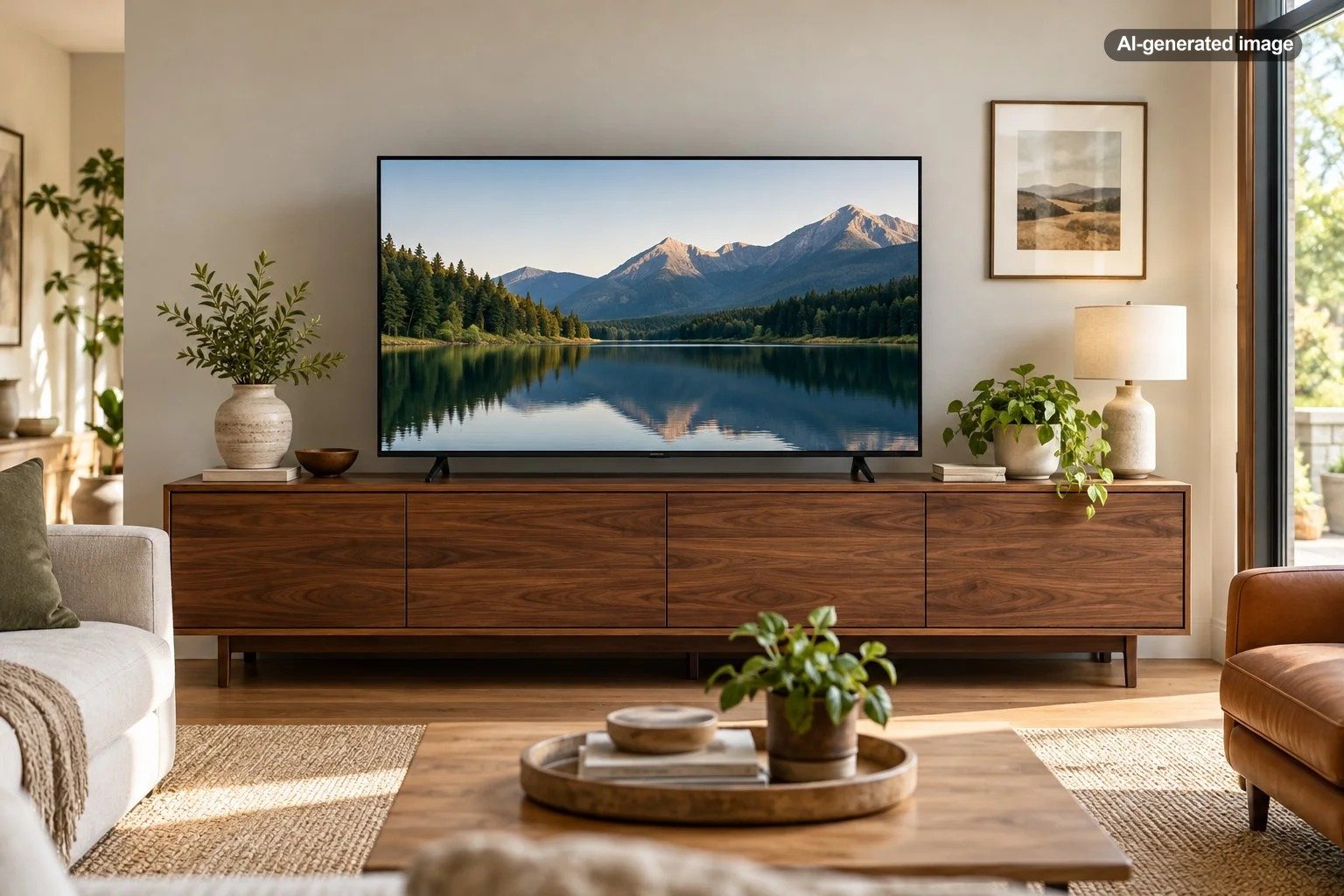
A TV console should generally be 6 to 12 inches wider than the television itself, leaving approximately 3 to 6 inches of extra width on each side. That is a useful starting point for creating a balanced living room arrangement without making the furniture unnecessarily large. In a spacious room, extending the console even farther beyond the screen can create an attractive, furniture-forward look.
The important detail is that televisions are measured diagonally, while TV consoles are measured horizontally. A television advertised as 65 inches is not actually 65 inches wide. Understanding that distinction can prevent an expensive furniture sizing mistake.
Why the TV Console Should Be Wider Than the Screen
A television is usually the strongest visual rectangle in a living room. When the furniture underneath is narrower than the screen, the arrangement can look top-heavy, particularly when viewed from across the room.
A wider console gives the television a visual foundation. The extra width creates breathing room, introduces horizontal balance, and makes the entire arrangement feel more deliberate.
The effect is similar whether the television sits directly on the furniture or hangs on the wall above it. A console that extends beyond the screen tends to make the composition appear more settled.
There are practical advantages, too. Additional width may provide room for media equipment, decorative objects, cabinet storage, or a soundbar. However, none of those benefits means that the widest possible console is automatically the best choice.
Visual proportion is a design preference, not a structural safety rule. The appropriate furniture size also depends on the television’s support configuration, the weight capacity of the console, and the surrounding space.
How Wide Should a TV Console Be for Different TV Sizes?
The following table offers approximate console widths for common widescreen televisions. Actual television dimensions vary by model, so these examples are useful for planning rather than substitutes for product measurements.
| TV diagonal size | Approximate TV width | Suggested console width |
|---|---|---|
| 43 inches | 38 inches | 44-50 inches |
| 50 inches | 44 inches | 50-56 inches |
| 55 inches | 48 inches | 54-60 inches |
| 65 inches | 57 inches | 63-69 inches |
| 75 inches | 65-66 inches | 72-78 inches |
| 85 inches | 74 inches | 80-86 inches |
These are moderate, practical starting ranges, not mandatory dimensions. A larger console may be visually preferable in a generously sized living room. A somewhat narrower option may be reasonable in a compact apartment, provided the television is properly supported or independently wall-mounted.
What Size Console Works With a 55-Inch TV?
A typical 55-inch television measures approximately 48 inches across. A console around 54 to 60 inches wide creates a comfortable margin on both sides.
For a small living room, a 54-inch cabinet may offer enough visual breathing room without overwhelming the wall. In a larger space, a 60- to 66-inch cabinet can create a broader furniture arrangement and provide additional storage.
What Size Console Works With a 65-Inch TV?
Most 65-inch widescreen televisions are approximately 57 inches wide. A console around 63 to 69 inches wide follows the basic proportion guideline.
A 70- or 72-inch console is another attractive option when the wall has sufficient space. The wider cabinet can accommodate additional storage without appearing disproportionately large beneath the screen.
What Size Console Works With a 75-Inch TV?
A typical 75-inch television measures around 65 to 66 inches horizontally. A console approximately 72 to 78 inches wide provides a useful starting range.
For a substantial entertainment wall, an 80- to 84-inch console can also look appropriate. The key is to evaluate how much of the surrounding wall the cabinet occupies and whether the extra length interferes with circulation or neighboring furniture.
How to Measure Your TV and Console Correctly
Before shopping for a console, take three separate measurements: the television’s actual width, the width of its support feet, and the available wall space.
What to do
- Measure the television horizontally. Measure from the outer left edge to the outer right edge of the frame, or consult the manufacturer’s dimensions without the stand.
- Measure the supporting feet or pedestal. If the television will stand on the cabinet, determine the full footprint of its base, including depth.
- Add your preferred side margins. For an initial estimate, add 3 to 6 inches to each side of the television’s actual width.
- Measure the wall and nearby furniture. Account for doorways, corners, floor vents, walkways, and surrounding cabinets.
- Check the furniture specifications. Confirm usable top dimensions, weight capacity, and any television support restrictions before purchasing.
For example, suppose a television measures 56.5 inches across. Adding 5 inches on either side gives a target console width of 66.5 inches. A cabinet approximately 66 to 70 inches wide would therefore be a sensible starting point.
Remember that overall cabinet width is not always the same as usable surface width. Some consoles feature raised edges, irregular tops, or decorative details that reduce the area available for the television’s feet.
Should the Console Be Wider if the TV Is Wall-Mounted?
A wall-mounted television offers greater flexibility because the console no longer needs to physically support the screen. You can choose furniture based more heavily on proportion, storage requirements, and the overall room composition.
In many living rooms, a wall-mounted television looks especially cohesive above a cabinet that extends approximately 6 to 12 inches beyond the screen on each side.
That wider arrangement can also provide space for decorative styling without placing objects directly in front of the television.
However, the television and cabinet should still feel visually related. A very narrow console beneath a large mounted screen can look disconnected. Conversely, an exceptionally long cabinet beneath a relatively small television can make the screen appear undersized.
There is no universal requirement that both objects be perfectly centered on the wall. Architectural details, built-in shelving, windows, and room circulation may make a slightly asymmetrical layout more successful.
If a console is wall-mounted or floating, follow the furniture manufacturer’s mounting and load requirements. A floating cabinet should not be assumed capable of supporting a television simply because its dimensions look suitable.
How Room Size Changes the Ideal Console Width
The relationship between the television and its console is important, but the furniture must also make sense within the entire room.
Small Living Rooms and Apartments
In a compact space, a console with approximately 3 inches of additional width on each side may be more practical than a substantially oversized cabinet.
Consider furniture with closed storage, shallow profiles, or slender legs to reduce visual bulk. A cabinet that fits the television beautifully but obstructs a nearby doorway is not a successful layout.
Wall-mounting the television can provide some flexibility when the room cannot accommodate a console wide enough for a conventional television footprint.
Medium-Sized Living Rooms
For an ordinary living room, approximately 4 to 6 inches of console width beyond each side of the screen often looks balanced.
A longer cabinet can be appropriate if the space includes a sectional sofa, large area rug, or substantial seating arrangement. The extra length may help the media furniture feel proportional to the other pieces in the room.
Large Living Rooms and Open Floor Plans
In a large room, the console may need additional visual presence to avoid looking lost against a long wall.
A cabinet that extends 6 to 12 inches beyond each side of the television can create a more expansive composition. In some rooms, an even longer cabinet works when treated as a substantial piece of furniture rather than merely a television stand.
The wall, furniture finish, cabinet height, and surrounding architectural features all influence whether a wider arrangement looks intentional.
Does Console Height Matter as Much as Width?
Yes. A console can be perfectly proportioned horizontally and still place the television at an uncomfortable viewing height.
When choosing cabinet height, consider the height of your seating, the television’s base, and the position of the screen when you are sitting normally. Ideally, the screen should be positioned for comfortable viewing without requiring you to continually tilt your head upward.
If the television sits directly on a tall console, its center may end up higher than intended. A lower media cabinet often gives larger televisions a more comfortable viewing position.
For wall-mounted screens, determine the preferred viewing height before deciding where the console will sit beneath them. The vertical space between the two should feel deliberate while leaving adequate access for equipment and ventilation.
Console depth matters as well. If you plan to store a receiver, gaming system, or other equipment inside the cabinet, verify the compartment dimensions, cable clearance, and ventilation requirements provided by the equipment manufacturers.
Can a TV Console Be Too Wide?
Absolutely. Although extra width generally helps anchor a television visually, a console that dominates the entire wall may feel unnecessarily heavy.
An overly wide console can also create practical problems. It may restrict access to outlets, crowd adjacent furniture, or reduce comfortable walking space.
The furniture’s visual weight matters just as much as its dimensions. A low cabinet with slim legs may look lighter than a deep, solid cabinet of the same width.
Color and finish influence the effect, too. A dark, substantial cabinet against a pale wall can appear larger, while a streamlined piece in a finish similar to the surrounding room may feel more restrained.
Rather than treating a particular width as universally correct, consider whether the console comfortably anchors the television without becoming the room’s dominant object.
Common Mistakes When Choosing a TV Console
Several easy-to-overlook details can affect the finished arrangement.
- Using the diagonal TV size as its width: This leads to inaccurate comparisons between the screen and cabinet.
- Ignoring the TV’s feet: Some television models have legs positioned near the outside edges, requiring a wider supporting surface than expected.
- Choosing width without checking depth: A cabinet may be wide enough but too shallow to support the television’s pedestal or accommodate media equipment.
- Forgetting the room around the console: Doors, walkways, heating registers, and nearby furniture all affect placement.
- Overlooking cabinet height: A tall console can place a large television uncomfortably high.
- Crowding the top with decorations: Objects positioned close to the screen can create visual distraction or interfere with equipment.
Another mistake is assuming that a large cabinet automatically prevents television tip-overs. For televisions placed on furniture, stability depends on the complete setup, not simply the relative widths of the screen and cabinet. Follow the television and furniture manufacturers’ instructions, use appropriate anti-tip measures, and avoid unsupported or unstable arrangements.
How to Style a Wider Console Without Making It Look Cluttered
One advantage of a slightly wider console is the opportunity to introduce a few carefully chosen decorative elements.
Consider placing a low stack of books at one end of the cabinet, a modest ceramic object at the other, or a shallow tray to organize small accessories. Keep the composition restrained so the television remains the focal point.
Vary the heights and shapes of decorative objects, but avoid arrangements that rise into the screen’s viewing area. A few objects with clear space between them often look more considered than a continuous line of accessories.
For a symmetrical room, matching objects or similarly weighted groupings on either side can reinforce balance. In a more relaxed interior, asymmetrical styling may feel natural as long as one side does not become disproportionately crowded.
When evaluating decorative objects, consider their dimensions, stability, and suitability for the surface. Fragile pieces may be inappropriate on frequently accessed media furniture, especially in households with children or pets.
There is also nothing wrong with leaving the console almost entirely clear. The cabinet itself can provide enough visual structure through its material, shape, and proportions.
Frequently Asked Questions
Is a TV stand that is only 2 inches wider than the TV acceptable?
It may work, particularly in a small space, but it leaves only about an inch of additional width on each side when centered. The arrangement can look tight. If the television sits on the stand, ensure its entire support footprint fits and all manufacturer requirements are satisfied.
Should a 65-inch TV go on a 60-inch console?
A typical 65-inch television is approximately 57 inches wide, so a 60-inch console would extend only about 1.5 inches beyond the screen on each side. It can be workable if the stand supports the television properly, but a console around 63 to 72 inches wide will often offer more balanced proportions.
Can a TV be wider than the console underneath it?
For a wall-mounted television, yes. A narrower console may work as an intentional design choice because the television is independently supported. For a television resting directly on furniture, the more important considerations are full support of the feet or pedestal, weight capacity, stability, and manufacturer instructions.
Should the TV be centered over the console?
Centering is generally the simplest way to create an orderly appearance, particularly when the wall arrangement is symmetrical. Slightly offset placement can work when surrounding architecture or furniture calls for it. Check that the final composition feels balanced from the main seating position.
Is a 72-inch console too wide for a 55-inch TV?
Not necessarily. A typical 55-inch screen is about 48 inches wide, leaving approximately 12 inches of additional console width on each side. That can create an attractive, expansive arrangement in a medium or large room, although it may feel excessive against a short wall.
The Bottom Line
For most living rooms, choosing a TV console 6 to 12 inches wider than the television’s actual horizontal width is a reliable starting point. This creates approximately 3 to 6 inches of extra width on each side and usually produces a balanced arrangement.
Small rooms may benefit from a more compact cabinet, while larger spaces can often accommodate a console that extends considerably farther beyond the screen.
Before making the final choice, check the television’s actual width, base dimensions, the furniture’s support specifications, and the available wall space. The best console is not simply the one that meets a sizing formula. It is the one that looks proportional, fits comfortably, and supports the way the room is actually used.